DJI Goggles Compatibility Guide: Which Headset Works With Which Drone?
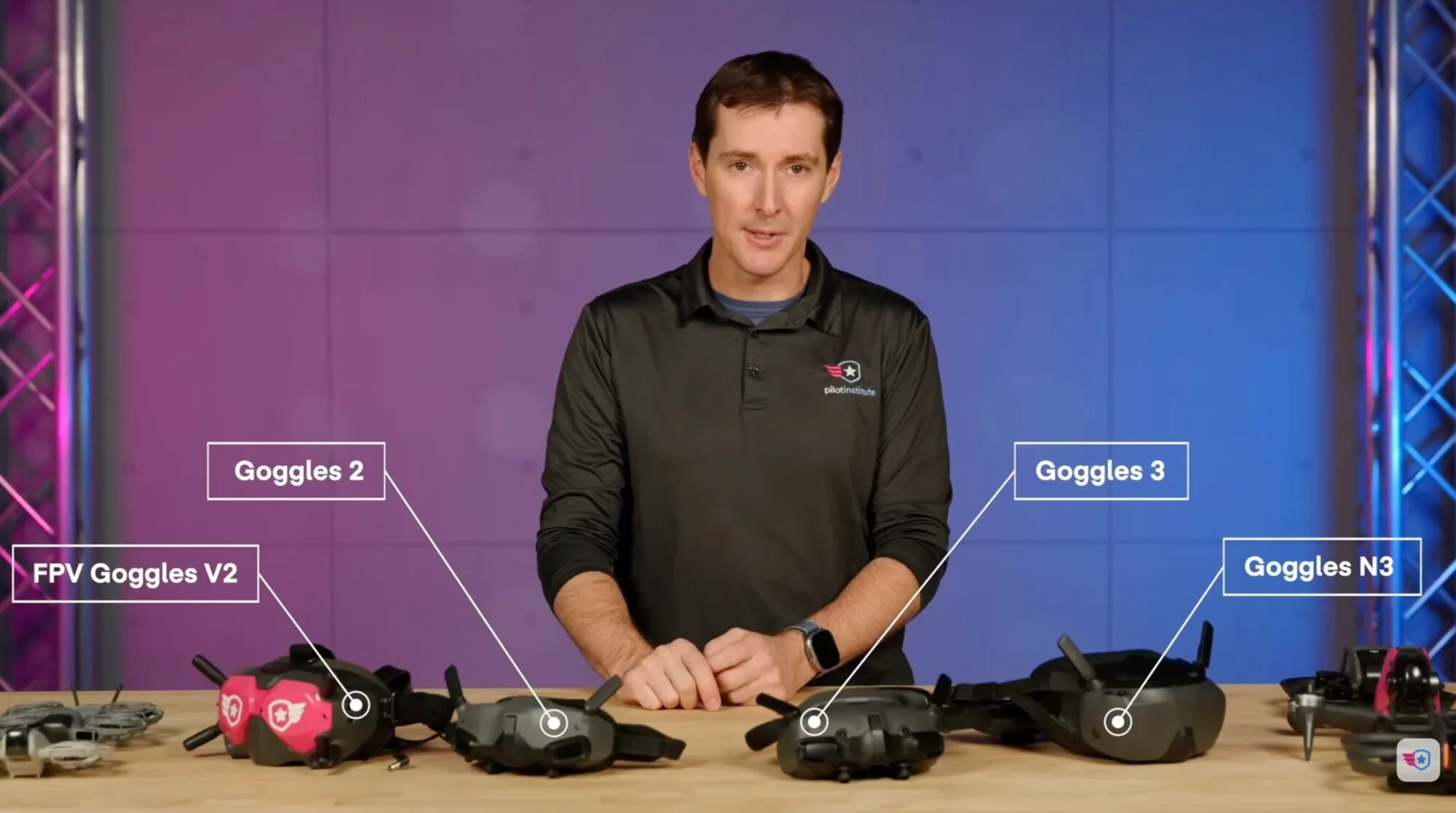
DJI offers multiple Goggles models—FPV Goggles V2, Goggles 2, Goggles Integra, Goggles 3, and Goggles N3—each supporting different drones via O3 or O4 transmission systems. This guide breaks down compatibility, frequency bands, latency specs, and pairing procedures to help users choose the right headset for their aircraft.
Highlights
- DJI Goggles 2 supports both O3 and O4 transmission systems with a minimum latency of 30 ms at 1080p/100fps and a maximum FCC range of 10 km, making it compatible with the DJI FPV, Avata, Avata 2, Air 3, Mini 3 series, and Mavic 3 series.
- DJI Goggles 3 features dual micro-OLED screens, a battery counterweight strap, up to 3 hours of use, and a 512 GB microSD card slot—the largest storage capacity of any DJI Goggles model—with compatibility limited to latest-generation O4 drones including Neo, Neo 2, and Avata 2.
- FPV Goggles V2 uses the O3 system, supports 1440p resolution with a minimum latency of 28 ms at 810p/120fps, and is compatible only with the DJI FPV and original Avata.
- Goggles Integra introduced dual micro-OLED displays and a rear battery counterweight strap for improved comfort, supporting the same O3/O4 aircraft as Goggles 2 including Mini 4 Pro, Air 3, and Mavic 3 series.
- DJI's 5.8 GHz band delivers cleaner video with less interference and is preferred for FPV flight, while 2.4 GHz offers greater range; newer Goggles models use Frequency Hopping to automatically switch between both bands.
Not sure which DJI Goggles work with your drone? You're not alone. Compatibility can be genuinely confusing, but you don't need to wade through thick manuals or scattered forum posts. Here's a clear breakdown of which DJI Goggles are compatible with which drones—and which combination best fits your needs.
Why Is Compatibility So Confusing?
Understanding why differences exist is key to figuring out which DJI Goggles work with your drone. It all comes down to the transmission system.
Newer DJI drones typically use O3 (short for OcuSync 3) or O4 air unit video transmission systems. The older O3 system delivers low-latency HD video and is found on aircraft like the Avata and DJI FPV. The improved O4 system offers longer range and more stable signal, powering newer models such as the Air 3 and Mini 4 Pro.
One important note: firmware matters here. When DJI releases a new drone, it often rolls out firmware updates that expand Goggles compatibility over time. Always ensure your drone is running the latest firmware. You can check current firmware requirements on the DJI website's download page.
Key Considerations When Buying Goggles: Frequency Bands and Latency
When shopping for Goggles, pay close attention to transmission range and latency.
Range depends primarily on the frequency used. Drone video transmission systems typically operate between 2.4 GHz and 5.8 GHz. The lower 2.4 GHz band offers greater range but is more susceptible to interference in Wi-Fi- and Bluetooth-dense environments, and image quality may degrade at longer distances. The higher 5.8 GHz band delivers cleaner video with less interference, making it generally preferred for FPV flying—though it has weaker wall and foliage penetration and shorter maximum range.
For this reason, some newer Goggles offer dual-band switching, automatically toggling between 2.4 GHz and 5.8 GHz. This technique, known as Frequency Hopping, helps minimize interference.
Also note that different countries and regions have their own frequency regulations, which affects the range figures DJI publishes. FCC refers to the United States (typically the longest range), CE to Europe, SRRC to China, and MIC to Japan.
Latency is the time it takes for video to travel from the drone to the Goggles display, measured in milliseconds (ms). Lower latency means more responsive imagery—critical for FPV or racing drones. High latency has limited impact on aerial photography but becomes a significant obstacle in flight scenarios requiring fast, precise control.
DJI FPV Goggles V2
The FPV Goggles V2 is the second iteration of DJI's first FPV headset, designed specifically for FPV drones such as the DJI FPV and the original Avata.
Key Specs:
- Dual 2-inch screens at 1440p resolution
- Built-in microSD card slot, up to 256 GB
- O3 transmission system
- Maximum range approximately 10 km (6.2 miles) under FCC regulations
- Low-latency mode: 810p/120fps at 28 ms; 810p/60fps at 40 ms
Firmware Update & Pairing:
To update FPV Goggles V2 firmware, connect the Goggles to your computer, open DJI Assistant 2 (confirm you have the correct version), select the Goggles, and follow the on-screen instructions.
To pair with the Avata, ensure both devices are on the latest firmware, then power on the Avata and press and hold the power button to enter pairing mode (note: press-and-hold differs from a double-press followed by a long press—the two functions are different). Once the indicator light begins flashing in sequence, put the Goggles into pairing mode by pressing the recessed red button next to the power port using a thin tool such as an unfolded paperclip or SIM card ejector pin. After pairing completes, go to the Goggles settings menu, scroll to the bottom of the "About" section, tap "Switch Aircraft," and select Avata to see the drone's video feed.
DJI Goggles 2
Goggles 2 is an excellent value option, delivering strong image quality, range, and low latency at a relatively accessible price point due to being an older model.
Key Specs:
- Dual screens, each at 1080p resolution
- microSD card support up to 256 GB
- Compatible with O3 and O4 air units
- Dual-band design with automatic 2.4 / 5.8 GHz switching
- Maximum range approximately 10 km (FCC)
- 1080p/100fps latency as low as 30 ms; 1080p/60fps latency as low as 40 ms
Compatible Aircraft:
- FPV drones: DJI FPV, Avata, Avata 2
- Consumer camera drones: Air 3, Mini 3, Mini 3 Pro, Mavic 3 series
- Compatible with DJI FPV Remote Controller 2 and RC Motion 2
Important Limitations: When using Goggles, certain intelligent flight modes are unavailable—including Zoom, Intelligent Shooting, Waypoints, MasterShots, and QuickShots. FocusTrack is also unsupported on the Mavic 3 series. However, the Mavic 3 and Mavic 3 Pro can use Explorer Mode for optical zoom while in Goggles.
When paired with the RC Motion controller, the Avata 2 and Mini 3 Pro support head tracking—turning your head while wearing the Goggles controls the drone's yaw direction or gimbal tilt angle.
Firmware Update & Pairing:
Connect Goggles 2 to your computer via USB-C, open DJI Assistant 2 (Consumer version), select Goggles 2, and click firmware update. To pair, ensure both devices are charged and powered on, then press and hold the Link button located between the two screens until the Goggles beep, then press and hold the drone's power button until the battery LEDs begin flashing. Pairing is complete when the LEDs stop flashing and stay solid, and the Goggles stop beeping.
To switch to a different aircraft, open the Goggles menu, tap "Status," select "Switch," and follow the on-screen prompts—a much simpler process than with the FPV Goggles V2.
DJI Goggles Integra
Goggles Integra was released after Goggles 2 and features dual micro-OLED displays at 1080p resolution. It introduces a battery counterweight strap design that places the battery at the rear of the head, significantly improving weight balance and wearing comfort.
Compatible Aircraft:
- FPV drones: Avata, Avata 2
- Consumer camera drones: Mini 4 Pro, Mini 3 Pro, Air 3, Mavic 3 Pro, Mavic 3
Highlights: Certain intelligent flight modes remain available when used with the Mini 4 Pro, Mini 3 Pro, and Air 3. Explorer Mode is supported with the Mavic 3 series, with optical zoom up to 28x. Latency specs match Goggles 2: as low as 30 ms at 1080p/100fps and 40 ms at 1080p/60fps.
DJI Goggles 3
Goggles 3 is DJI's current flagship headset, equipped with upgraded dual micro-OLED screens that deliver the sharpest image quality in the lineup. When paired with the RC Motion Controller 3, head tracking response is highly responsive, giving users an immersive, cockpit-like flying experience.
Key Specs:
- Dual micro-OLED screens with the clearest image in the lineup
- Battery counterweight strap design for a lightweight, balanced fit
- Up to 3 hours of flight time
- microSD card slot supporting up to 512 GB (far exceeding other models)
Compatible Aircraft:
- FPV drones: Neo, Neo 2, Avata 2
- Plus additional latest-generation models (see DJI's official website for the full list)
DJI Goggles N3
Goggles N3 is the most recently launched DJI Goggles model, positioned below the premium Goggles 3 as a more affordable entry point. It also supports the latest generation of DJI drones.
How to Choose the Right DJI Goggles for You
| Model | Transmission | Resolution | Min. Latency | Max. Range (FCC) | Compatible Drones |
|---|---|---|---|---|---|
| FPV Goggles V2 | O3 | 1440p | 28 ms | 10 km | DJI FPV, Avata |
| Goggles 2 | O3 / O4 | 1080p | 30 ms | 10 km | FPV + camera drones (Air 3, Mini 3 series, Mavic 3 series, etc.) |
| Goggles Integra | O3 / O4 | 1080p | 30 ms | — | FPV + camera drones (Mini 4 Pro, Air 3, Mavic 3 series, etc.) |
| Goggles 3 | O4 | micro-OLED | Lowest | — | Neo, Neo 2, Avata 2, and latest models |
| Goggles N3 | O4 | — | — | — | Latest models |
Buying Recommendations:
- Budget-conscious users with FPV or older camera drones: Goggles 2 offers the best value
- Users who want maximum immersion and compatibility with the latest aircraft: Goggles 3
- Entry-level FPV flying primarily with DJI FPV or the original Avata: FPV Goggles V2
Always confirm that your chosen Goggles are compatible with your specific drone model, and keep firmware updated for the best compatibility and flight experience.
原文來源: 查看原文
FAQ
Reviewed and published by the LAETimes editorial desk ·