DJI Osmo Mobile 8P Review: The FrameTap Controller Changes Everything
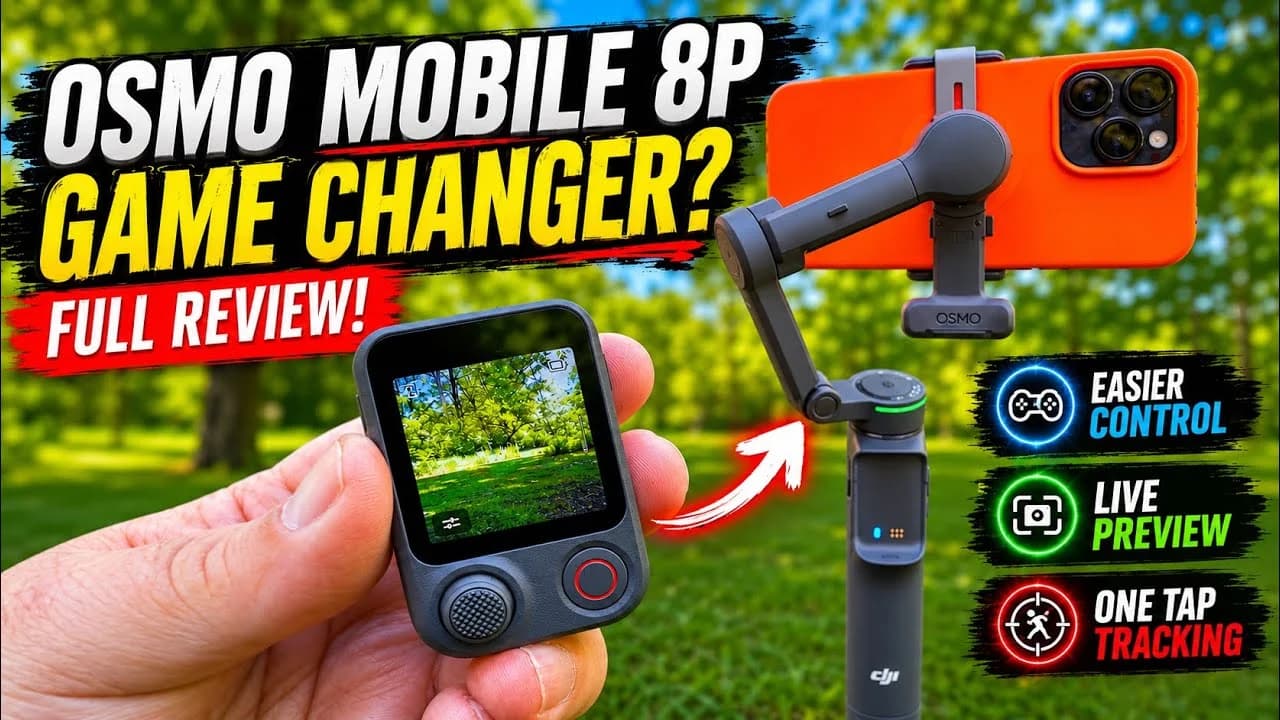
The standout feature of the DJI Osmo Mobile 8P Pro is the all-new FrameTap controller — a detachable unit with a large touchscreen, joystick, and shutter button that provides live preview footage. It lets solo creators remotely control their shoot without running back to the gimbal. The updated tracking module now supports MagSafe connectivity, and a wider tripod base improves overall stability.

Highlights
- The DJI Osmo Mobile 8P Pro's FrameTap controller is a detachable unit with a live-preview touchscreen, joystick, and shutter button that lets solo creators remotely control shooting without returning to the gimbal.
- The FrameTap offers two live preview modes: a mirrored phone-screen view (swipe right) and a direct feed from the tracking module's camera (swipe left), enabling on-screen subject selection.
- The second-generation tracking module connects to the gimbal arm instead of the phone clamp, allowing simultaneous use with a MagSafe connector — a limitation that affected both the Osmo Mobile 7 and 8.
- The upgraded tripod base features wider-splaying legs for greater stability on the ground, and a standard 1/4-inch thread for mounting on any tripod.
- DJI's detachable screen controller concept in the Osmo Mobile 8P Pro is expected to potentially extend to other product lines, marking a significant shift in how gimbals are operated.
DJI Osmo Mobile 8P Review: The FrameTap Controller Changes Everything
Hi everyone — I'm Shawn from Air Photography. DJI has done something genuinely interesting with the Osmo Mobile 8P (Pro edition), and that something is the brand-new FrameTap controller. Across the many updates and upgrades the Osmo Mobile line has seen over the years, the FrameTap controller may well be the single most significant advancement yet.
As you can see, the controller is built directly into the handle, letting you use the Osmo Mobile in the traditional handheld fashion with every control at your fingertips. The bright display makes adjusting settings easy. But when you detach the controller, the real magic begins — it unlocks ways of using the Osmo Mobile that simply weren't possible before, dramatically expanding its usefulness for a wide range of creators.
Why Smartphone Gimbals Still Matter
Smartphone gimbals aren't for everyone. Modern smartphones already feature impressive built-in stabilization, and in many situations a gimbal simply isn't necessary. However, for certain users — content creators, independent YouTubers, vloggers — a smartphone gimbal is an essential creative tool, and this new controller takes the experience to an entirely new level.
Sometimes a new generation of a product brings only incremental improvements. The Osmo Mobile line has certainly had its share of meaningful upgrades in recent years — the introduction of the tracking module fundamentally changed how subject tracking works — but the FrameTap controller is a genuine leap forward.
All Controls in One Hand
The FrameTap controller features a large touchscreen that makes it easy to switch between gimbal modes. You can rotate the gimbal 180 degrees to choose between the front and rear cameras, toggle freely between portrait and landscape orientations, and switch between cameras with ease. There's also a shutter button that starts/stops recording or captures a photo depending on the current mode.
The joystick lets you adjust the gimbal angle to pan and tilt the camera, and pressing the side button switches joystick control to zoom. For creators working solo — for instance, letting the gimbal track you during a live stream — the FrameTap controller dramatically simplifies the workflow. No more running back to the tripod to start or stop recording, or checking that your settings are correct. Handle everything on the controller, slip it into your pocket, and keep on filming.
Live Preview on the Controller
What truly makes the FrameTap powerful is the ability to see a live preview feed directly on the controller. There are two ways to access it.
The first is by swiping in from the right, which displays a mirrored view of your phone's screen complete with all key information — so you can be certain your framing is correct without any guesswork. You can switch the view between landscape and portrait, and zoom in to check fine details.
The second is by swiping in from the left, which shows the feed from the tracking module's built-in camera. This view is extremely convenient: you can activate tracking and select your subject right on the screen by simply drawing a box around the target. Crucially, tracking isn't limited to people — pets, individuals, and even inanimate objects can all be tracked with ease. It's an intuitive, direct way to operate the gimbal without constantly returning to it to check settings.
Gesture control to start and stop tracking is also supported, but in my opinion the direct preview-and-tap approach is more convenient and ensures you're capturing exactly what you intend.
A Rich Set of Creative Shooting Tools
The device comes loaded with creative shooting features, including Spin Shot and Surround Shot modes, as well as an A-B path function that lets you set different waypoints for smooth, automated camera movements. The FrameTap controller also lets you adjust the brightness and color temperature of the tracking module's built-in fill light — an intuitive, no-fuss experience.
New Second-Generation Tracking Module
Another key update on the Osmo Mobile 8P Pro is the second-generation tracking module. One important change: you no longer need to connect it directly to the phone clamp to use it. On the previous Osmo Mobile 8 and Osmo Mobile 7, the tracking module had to attach to the clamp to function — which worked fine, but created a conflict for MagSafe-compatible phone users. If you wanted to use DJI's MagSafe connector, you couldn't simultaneously use the tracking module; it was one or the other.
The new tracking module connects directly to the gimbal arm instead, allowing a MagSafe connector to be used alongside it without any compromise. As before, the tracking module can be reversed, giving you full freedom to choose the tracking direction and the orientation of the fill light.
A More Stable Base and the Familiar Extension Rod
The tripod at the base of the Osmo Mobile 8P has also been upgraded. Compared to its predecessor, the legs splay out noticeably wider when open, delivering a much more stable footprint. This matters especially when the camera is placed on the ground — the wider the base, the better, particularly when used with an extension rod. A standard 1/4-inch thread on the bottom makes mounting on any tripod effortless.
As with previous Osmo Mobile models, a built-in extension rod is included for a more comfortable angle and greater shooting distance during vlog-style filming. The tip of the rod tilts up to a natural angle or tilts backward, making it ideal for low-angle shots.
Who Is It For — and What Comes Next?
As noted, this kind of device isn't for everyone, but for certain creators — especially now with FrameTap — it becomes an exceptionally powerful tool. And it's not limited to professional creators or vloggers. Even if you simply enjoy documenting a hobby, the Osmo Mobile 8P with FrameTap is like having your own dedicated camera operator. You can adjust framing on the fly without even relying on tracking — just mount the gimbal on a tripod, then freely zoom, pan, and reframe using the controller to capture and share moments to social media.
It will also be fascinating to see how DJI extends this technology to other product lines. The concept of a detachable screen controller could very well make its way to more devices — and that's something well worth watching.
This article is based on a video produced by Shawn of the Air Photography channel. For more content, visit the Air Photography YouTube channel.
原文來源: 查看原文
FAQ
Newsletter
Subscribe to our Low-Altitude Industry Newsletter
Daily curated news on low-altitude economy and drone industry, delivered to your inbox.